Ghost 6 theme for newsrooms
Well-documentedMeridian
A Ghost news theme that reads like a broadsheet, for Newsrooms & Magazines
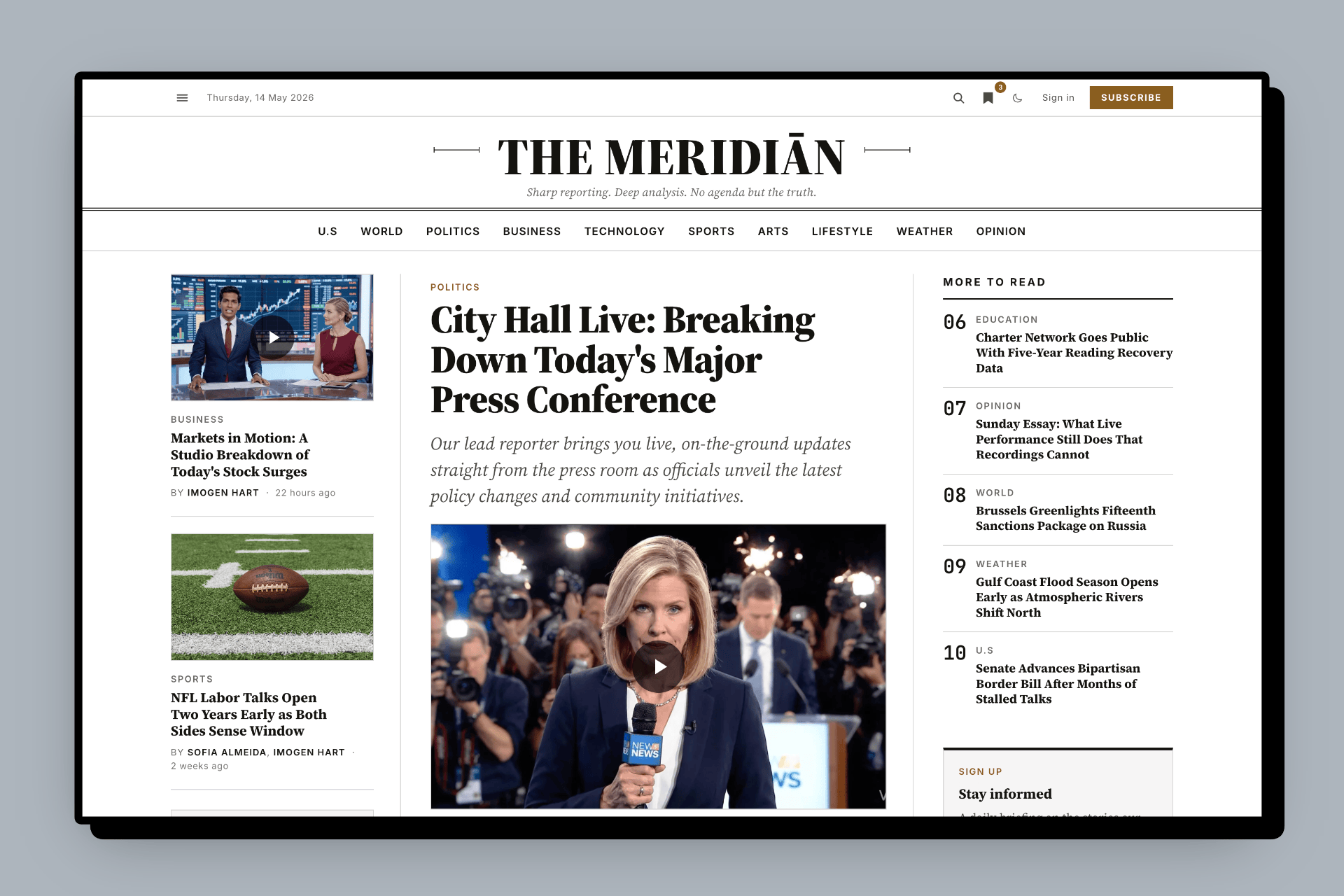
Meridian is a premium Ghost news theme for newsrooms, magazines, and digital publishers. Built for editors running real desks: daily news, section archives, opinion columns, paywalled investigations. Compose a broadsheet-style homepage from seven editorial layouts, convert readers with the built-in paywall, and let visitors control text size and dark mode. All from Ghost Admin, with no code or plugins.
Built by a Certified Ghost Expert
Step-by-step setup guides for editors
Lifetime updates included
14-day money-back guarantee
Current release
v1.4.1
Released May 2026
Requires Ghost 6.0+
Homepage rows
Up to 30, mix & repeat
Stack seven reusable layouts in any order. Repeat up to 30 times.
The Ghost CMS news theme for publications that read like newspapers, not blogs.
Meridian is a Ghost CMS theme for newsrooms, magazines, and independent publishers. It's built for editors who run real desks: daily news, section archives, opinion columns, paywalled investigations. The screen reads like a broadsheet, with a strong masthead, a hero story flanked by supporting columns, predictable section rules, and typography that respects the reader.
News publications
Daily news sites with section-driven homepage hierarchy and deep archives.
Digital magazines
Long-form editorial publications with a strong typographic identity.
Opinion-led publications
Dedicated opinion layout with columnist hedcuts where the byline is the brand.
Independent journalism
Built-in paywall, tier-aware member CTAs, and a conversion-focused membership band.
Probably not for: one-page brochure sites, single-author personal newsletters, or lifestyle blogs without sections. Meridian is opinionated and editorial. It expects desks, columns, and a publishing calendar.
Seven newspaper-style homepage layouts. Compose the front page your way.
Pick from seven editorial layouts and stack them in any order. Maybe a feature package up top, two briefing rows for different desks, an opinion column, then a markets-style lead list. Each row is just a normal Ghost page, so anyone on your team can edit the homepage. Reuse the same layout as many times as you need. Tap any layout to view it full-size.

Feature Package
Cinematic hero with a supporting story stack. Use for: the lead investigation or the day's biggest story.

Asymmetric Lead List
Lead post with a headline-list rail beside it. Use for: Markets, Politics, and other vertical desks where one story leads.

Briefing
Image-less digest cards in a tight grid. Use for: morning briefings, roundups, and overnight summaries.

Briefing Carousel
Horizontal scroll-snap deck of briefing cards. Use for: longer queues without growing the homepage.

Opinion Hedcut
Columnist cards with portrait and italic column title. Use for: the Opinion, Editorial, or Commentary desk.

Tag Columns
N parallel columns, one per public tag on the recipe page. Use for: a section index that mirrors your navigation.

Standard Grid
Three-up paginated carousel using default post cards. Use for: general news, features, or anything that doesn't fit one of the six specialized layouts.
Easy to set up from Ghost Admin. No code, no plugins, no template edits. Each row is a normal Ghost page. Pick a layout, name your section, hit publish. Reuse the same layout as many times as you want; three briefing rows for three different desks is a normal setup. Up to 30 rows render on the homepage by default. See the homepage sections guide →
Four paper palettes. Paired light and dark.
Pick a paper tone that fits your newsroom. Each preset ships a light-mode and dark-mode value designed together, so the personality of your chosen paper survives the color-scheme switch instead of flattening into a generic grey.

Newsprint · Default
Warm off-white paper with classic ink. The signature newspaper look.

Mist
Cool, minimal, modern. A subtle blue-grey for tech and design publications.

Stone
Warm muted gray, magazine-feel. Sits between Newsprint and Press.

Press
Stark black and white, maximum contrast. The high-contrast option for bold publications.
Light · Dark · System. Every combination meets WCAG AAA body-text contrast.
Reader-controlled
Dark mode that respects the print.
Meridian's dark mode isn't a colour-inversion afterthought. Each of the four paper palettes ships paired light + dark values, so the personality of your chosen paper tone survives the switch instead of flattening into a generic grey.
Readers pick Light, Dark, or System from the masthead reader controls; their choice persists across visits and syncs across tabs. The optional Dark mode logo upload swaps the wordmark cleanly when dark mode is active.

Eleven editorial typefaces. One serif by default.
Eleven self-hosted variable typefaces, picked specifically for long-form editorial reading, plus JetBrains Mono for code. Only the fonts you actually pick are preloaded. Choose the same family for heading and body and the duplicate preload is skipped automatically.

Use Meridian's defaults, or pick your own. Meridian's font settings are curated defaults. Set a custom font in Ghost's own picker and that wins instead. No fight between the two systems. See the font settings guide →
Reads like a broadsheet, on paper too
Every post is ready for the printed page.
Meridian is a print-editorial theme, and it means it. When a reader prints an article or saves it as a PDF, they do not get a screenshot of a web page. They get a clean, typeset document: black on white, justified serif text, the screen clutter stripped away. Readers can print straight from the article toolbar or use their browser's own print command, and it works on every post.


Cover page
A proper masthead
Each printout opens like a front page: your publication name, the section, the date, the headline, and the byline.
The body
Clean, typeset reading
Justified serif text, drop caps kept, sensible page breaks. Navigation, comments, share buttons, and sign-up prompts all drop away.
Every page
Headline and page numbers
The headline runs along the top of every page and the page count along the bottom, the way a printed publication should.
Colophon
A footer that credits the source
The last page notes where the article was printed from, the date it was printed, and your copyright line.
Translated, and paywall-aware. The cover page and colophon print in your publication's language, not just English. On members-only posts, the Print action only shows for readers who can see the full story, so no one prints a page of teaser text. Useful for archives, press clippings, classroom hand-outs, and readers who simply prefer paper. See the printing guide →
A complete editorial workflow, in one theme.
Four newsroom moves wired into Ghost's existing primitives, so editors never touch templates. Curate. Compose. Convert. Voice.
Curate
Editor's Picks
Toggle Featured on any story and it shows up top in a scrollable strip. Newest first, up to 8 stories, auto-hidden when empty.
Setup guide →Compose
Section rows
Each row is a normal Ghost page. Pick a layout, name your section, hit publish. No code or plugins needed.
Setup guide →Convert
Membership CTA
A full-bleed band above the footer on every page. Edit it like any Ghost page; pricing fills in from your tiers automatically.
Setup guide →Voice
Editor's note
A short italic note on the homepage in the editor's voice. Edit it like any Ghost page.
Setup guide →Plus editorial finishes: drop caps for opening paragraphs, breaking-news badges, and legal page slots in the footer. See the editorial conventions guide →
Lead with video, not just a photo.
Some stories are better watched than read. Meridian gives them a proper home: your video or YouTube clip leads the article in place of the cover image, ready to play the moment a reader taps it. Once it is playing, it stays with them as they read on and move between stories, so they never have to choose between watching and browsing. Nothing ever plays on its own, and it looks just as good on a phone as on a desktop.

Set up in a minute
Add your video to the post, choose a cover image, and mark it as a video story. That is the whole setup, all from the Ghost editor you already know.

Plays right in the story
The cover image becomes a tap-to-play poster, and the video plays right at the top of the article. No pop-ups, no new tabs.

Stays with the reader, story to story
Once a video is playing, it tucks into a small corner player as the reader carries on, and keeps playing as they move from one story to the next. They can watch and read at the same time, and close it whenever they like.

Spotted at a glance
A play badge appears on every video story across your site, so readers know there is something to watch before they click.
No surprises. Mark a post as a video story but leave the video out, and Meridian simply shows your cover image as usual. There is no broken state to worry about. See the video posts guide →
Built for the reader, not just the publisher.
Local bookmarks that need no API key. Reader controls for text size and color mode. Both persist across visits and sync across tabs.


A membership conversion path baked into every page.
Two member CTAs ship with Meridian. A full-bleed editorial band above the footer on every page, and a tier-aware box at the end of every article. Both editable without touching theme code.

Membership CTA band
Edit it like any Ghost page. Pricing fills in from your tiers automatically. Hides itself for paid members and when memberships are off.

Tier-aware post CTA
Logged-out readers get signup. Free members on paid posts get a tier-aware upgrade prompt. Paid members never see it; the box is hidden entirely.
Want the band off? Unpublish the page. That's the switch. No theme setting required. See the membership CTA guide →
Advertising, done properly
The most complete ad system in any Ghost theme.
Most Ghost themes leave ads to you and a code box. Meridian ships a full advertising system you run from Ghost Admin: drop in Google AdSense, sell your own banners, or do both. Every slot sits inside the editorial layout instead of fighting it.
Paying members never see an ad, and the ad scripts never load for them. Free readers help fund the work, subscribers get the clean read they paid for.

Native Google AdSense
Paste your publisher ID, done.
Add your AdSense publisher ID once and Meridian loads everything for you, Auto ads included. Prefer another network or Google Ad Manager? Paste its ad code into any slot. The page stays network-agnostic.
House ads
Sell your own banners, no code.
Running a direct deal or sponsorship? Upload a banner image, link it, publish. No network, no script, no cookie. Meridian even opens the link in a new tab and tags it as a paid link, the way search engines expect.
Six ready-made placements, plus as many homepage slots as you want.
Turn on a spot by creating a page. Skip the rest. Nothing renders where you have not placed an ad, so your layout never breaks or shows a blank gap.

Header bar
A sticky leaderboard at the very top, site-wide.

Homepage in-feed
Ad rows between homepage sections, as many as you want.

Section and author pages
Woven between the rows on archive pages.

In-article
At the top of a post, hidden from readers without access.

Post footer
At the end of a post, before the author card.

Mobile sticky footer
A dismissible bar pinned to the bottom on phones.
Desktop and mobile
A creative for each screen
Serve a wide banner on desktop and a purpose-built creative on phones. One ad, two images, with no shrinking a leaderboard down to a smudge.
Members
Subscribers read ad-free
Ads are hidden from paying members automatically, and the ad scripts never even download for them.
Search-safe links
Tagged the right way
Banner links open in a new tab and are marked as paid links automatically, so your ads never affect your own search ranking.
Network-friendly
True-size slots
Every slot renders at its real size and reserves its space, so ad networks never penalise a reduced unit and the page does not jump as ads load.
Privacy handled for the EU and the US. Static image banners set no cookies at all. For ad networks, Meridian emits a consent baseline for visitors in the EU, UK, and Switzerland so ad cookies wait for consent, and it works alongside Google's own consent message or your own. See the ads guide →
Modern stack, careful defaults
Built for everyone.
Designed to WCAG AAA contrast and keyboard-friendly throughout, with reduced-motion support for sensitive readers. The mobile menu behaves like a proper dialog. Keyboard, focus, and Esc all work the way readers expect.
Under the hood, Meridian uses a modern web stack so pages stay fast. Image galleries only load when there's a gallery, fonts only load if you actually pick them, and there are no third-party trackers. Developers get the full source for deeper customization.
Accessibility
WCAG AAA
Body-text contrast across every paper palette, light and dark
Paper palettes
4
Newsprint, Mist, Stone, Press. Paired light and dark.
Source files
Included
Handlebars, Tailwind, and JavaScript source for licensed buyers
Updates
Lifetime
Pay once. Every future Meridian release is included.
Reaches every reader
Speaks your readers' language, out of the box.
Set your publication's language in Ghost and Meridian translates its own interface to match: the bylines, reading time, dates, pagination, search, buttons, subscribe prompts, comment labels, error pages, and even the printed cover page. There is nothing to wire up and no code to touch. Your navigation menu and the stories you write stay in your hands; the theme only ever translates the labels it adds itself.
Apart from English, Meridian's interface is ready in twelve more languages:
Want the full list of what gets translated, and how to switch it on? See the languages guide →

From the builder
Built by a Certified Ghost Expert.
"Every Ghost theme I tried for news clients was a blog theme with a serif swap. Meridian is the one I wished existed when those briefs landed on my desk."Kasun Jayarathna · Builder · Certified Ghost Expert
Meridian is built by Kasun, a Certified Ghost Expert who works on Ghost CMS setup, migration, customization, and production publishing workflows. When you need help with the theme, you are dealing with someone who works in Ghost every day.
Installation help is available on request. Product issues and setup questions are handled by email.
Shipped, and still shipping.
Meridian keeps getting better after you buy it. Recent updates brought video posts, clearer subscriber labels on every story, twelve more languages, a thorough accessibility pass, and a quick contents list for long reads. Every update is free, for as long as you own the theme.
v1.3.0
A quick contents list for long reads, so readers can scan the sections before diving in.
v1.2.0
Twelve more languages, so more of your readers feel at home.
v1.1.1
Clearer subscriber labels on story cards, and a sharper invitation to join.
Everything in the box.
A complete print-editorial Ghost theme package, grouped by the decisions newsroom buyers actually need to make.
Editorial layouts
- Seven reusable section row layouts, repeatable up to 30 rows per homepage
- Asymmetric responsive 3-column lead grid with most-read rail
- Editor's Picks horizontal scroll strip (Ghost Featured flag)
- 18-post archive tail under the section band
- Video posts that lead the story with a tap-to-play player and a corner mini-player
- Custom-styled 404 page
Paper palettes & typography
- Four paper palette presets (Newsprint, Mist, Stone, Press)
- 11 self-hosted variable typefaces + JetBrains Mono
- Ghost custom-font picker honoured; theme settings as defaults
- Conditional preload, so only fonts in active use load
- Optional dark-mode logo upload that swaps automatically
Reader tools
- Local bookmarks page at
/bookmarks/with no API key required - Reader controls popover for text size and appearance, with cross-tab sync
- Dark / Light / System with optional dark-mode logo
- Reading progress + sticky article bar on every post
- PhotoSwipe galleries on Koenig gallery + image cards
- Theme interface translated into 12 languages beyond English
Memberships & paywall
- Full-bleed Membership CTA band above the footer on every page
- Tier-aware post-page member CTA (signup → upgrade → hidden)
- Visibility chips for Public, Free members, Paid, and Subscribers only
- Ghost Portal, native comments, and Ghost Recommendations
- Auto-fill pricing from your cheapest active public paid tier
Advertising & monetization
- Native Google AdSense with one publisher ID, Auto ads included
- House image banners with no code, plus any third-party ad network
- Six fixed placements plus unlimited in-feed homepage ad rows
- Separate desktop and mobile creatives, dismissible mobile sticky bar
- Ads hidden from paying members, scripts never load for them
- Consent Mode baseline for the EU, UK, and Switzerland
Navigation
- Primary masthead bar with edge-fade overflow on mobile
- Secondary hamburger drawer with body-scroll lock, focus trap, and Esc-to-close
- Group menu items into footer columns with a simple naming convention
- External URLs auto-gain a small ↗ icon
Social & legal
- 20+ social platforms via Code Injection, no theme edits needed
- Per-link placement (footer / author / both) and custom SVG fallback
- Auto-detect platform from URL hostname
- Footer legal links (Privacy, Terms, Imprint) editable from Ghost Admin
- Print stylesheet with cover masthead, drop caps, and colophon
Built for speed & developers
- Tailwind CSS v4 with design tokens in CSS variables (no config file)
- Vite 8 build (
yarn dev/yarn build/yarn zip) - Alpine.js 3 + collapse / focus / intersect plugins
- PhotoSwipe 5 with dynamic import (only loads when galleries exist)
- One inline script for FOUC prevention, with a CSP-friendly hash
- Full source files included for licensed buyers
License & support
- Single-site license
- Lifetime updates
- 14-day money-back guarantee
Setup guides at a glance.
Deep-link into the docs for the features you'll configure on day one. Every guide is written for editors, not just developers.
Homepage sections
Compose front-page rows from Ghost Admin. No code required.
Membership CTA
Wire up the conversion band and tier-aware article prompts.
Reader controls
Text size, light / dark / system, cross-tab sync.
Bookmarks page
Saved-articles page that works without any login or API key.
Editorial conventions
Drop caps, breaking-news badges, print stylesheet.
Theme settings
Brand colors, paper palette, fonts, dark-mode logo.
Support and resources
Compatibility
Meridian requires Ghost 6.0+. Ghost itself refuses to activate the theme on Ghost 5.x.
Need help?
Email support for setup questions, product issues, and installation help requests.
hello@enova.studioTrust the builder
What clients say about working with Enova Studio
Meridian is built by Kasun Jayarathna, a Certified Ghost Expert who has shipped Ghost sites for newsrooms, magazines, and independent publishers around the world. These are quotes from clients who have hired Enova Studio for their own Ghost projects.
“Kasun is an award-winning Ghost web developer whose exceptional communication, flawless delivery, and commitment to exceeding expectations make him a dream to work with. He transforms ideas into stunning, high-performing websites.”

Kelli Law
thelimitlesslife.co


Trusted by independent publishers, journalists, and creators worldwide.
See the work in recent client projects.
Questions?
Which Ghost version does Meridian support?
package.json. Ghost itself will refuse to activate the theme on Ghost 5.x, so upgrade your Ghost installation first, then install Meridian.Do I need to know code?
Does Meridian support languages other than English?
Can I publish video posts?
Does Meridian support Google AdSense and display ads?
Will ads show to my paying members?
What happens when a reader prints an article?
What is included in the download?
What if the theme isn't right for me?
How do the homepage section rows work?
#home-* internal tags to pick the layout, then add the public tag whose name should appear as the section header. Its newest posts fill the row. Page publish date orders the rows on the homepage, up to 30 rows by default. Layouts are reusable: three briefing rows for three different desks, or two asymmetric lead lists for Markets and Politics. The same seven layouts cover any number of section rows.Can I have more than 30 sections on the homepage?
What does the license cover, including client work?
Can I modify the design?
Is installation help available?
What happens if I need support?
Is Meridian a good Ghost theme for newsrooms?
How does Meridian compare to WordPress newspaper themes?
Is Meridian a good Substack alternative for newsrooms?
Why Meridian over WordPress, Substack, or a generic Ghost blog theme?
Newsrooms and magazines outgrow generic tools fast. Here's how Meridian compares to the three alternatives most editors weigh.
vs WordPress
From WordPress newspaper themes to a faster Ghost stack
WordPress newspaper themes are powerful but slow, plugin-dependent, and expensive to maintain. Meridian gives you the same broadsheet hierarchy on Ghost CMS, with no plugins, faster Core Web Vitals, and a built-in paywall instead of a $200/year membership plugin.
vs Substack
Own your newsroom: a Substack alternative for serious publications
Substack works for solo newsletter writers. Meridian gives newsrooms a real homepage, sections, archives, multi-author bylines, and a paywall, without Substack's 10% revenue cut and platform lock-in. Members live in your Ghost database, not theirs.
vs Generic Ghost themes
Built for desks, not blogs
Most Ghost themes are blog-shaped: one feed, recent posts on top. Meridian is newspaper-shaped: a section-driven homepage with up to 30 mix-and-match rows, opinion-led layouts, and editorial typography across eleven self-hosted typefaces. It is also the only Ghost theme with a built-in ad system: AdSense, house banners, and six placements, all run from Ghost Admin.
Ready to launch your newsroom with Meridian?
Get the full theme, source files, documentation, email support, and lifetime updates.
One-time payment · Lifetime updates · Single-site license · 14-day money-back guarantee
Not the right fit for your site? Email us within 14 days of purchase for a full refund. No forms, no hassle.

