Ghost 6 podcast theme
Well-documentedSignal
The most complete podcast theme for Ghost.
Video, audio, embed, and blog episodes on one theme, with a player that keeps playing as your audience moves around the site. Searchable transcripts, tappable chapters, a reader Library, listen links to every major platform, and a companion extension, included with Signal, that writes your show notes, transcript, and chapters. Use it with the extension, or without.
Built by a Certified Ghost Expert
Step-by-step setup guides for editors
Lifetime updates
14-day money-back guarantee
Extension included
Signal Tools turns a YouTube, audio, or podcast link into a publish-ready episode, with show notes, transcript, and chapters.
Current release
v1.3.2
Updated September 2026
Requires Ghost 6.0+
Listen everywhere
22+ platforms
Apple Podcasts, Spotify, YouTube, RSS, and more
New to Ghost? We'll set Signal up for you, free. Start Ghost Pro through our link and a Certified Ghost Expert installs the theme, matches it to the demo, and connects your domain.
See how it worksMade for shows, not blog posts.
Signal runs your podcast on Ghost's native content model. Episodes are posts, hosts and guests are authors, shows and topics are tags. No custom fields, no plugins, no code. A publishing surface built for video and audio shows that want to own their audience.
Video podcasters
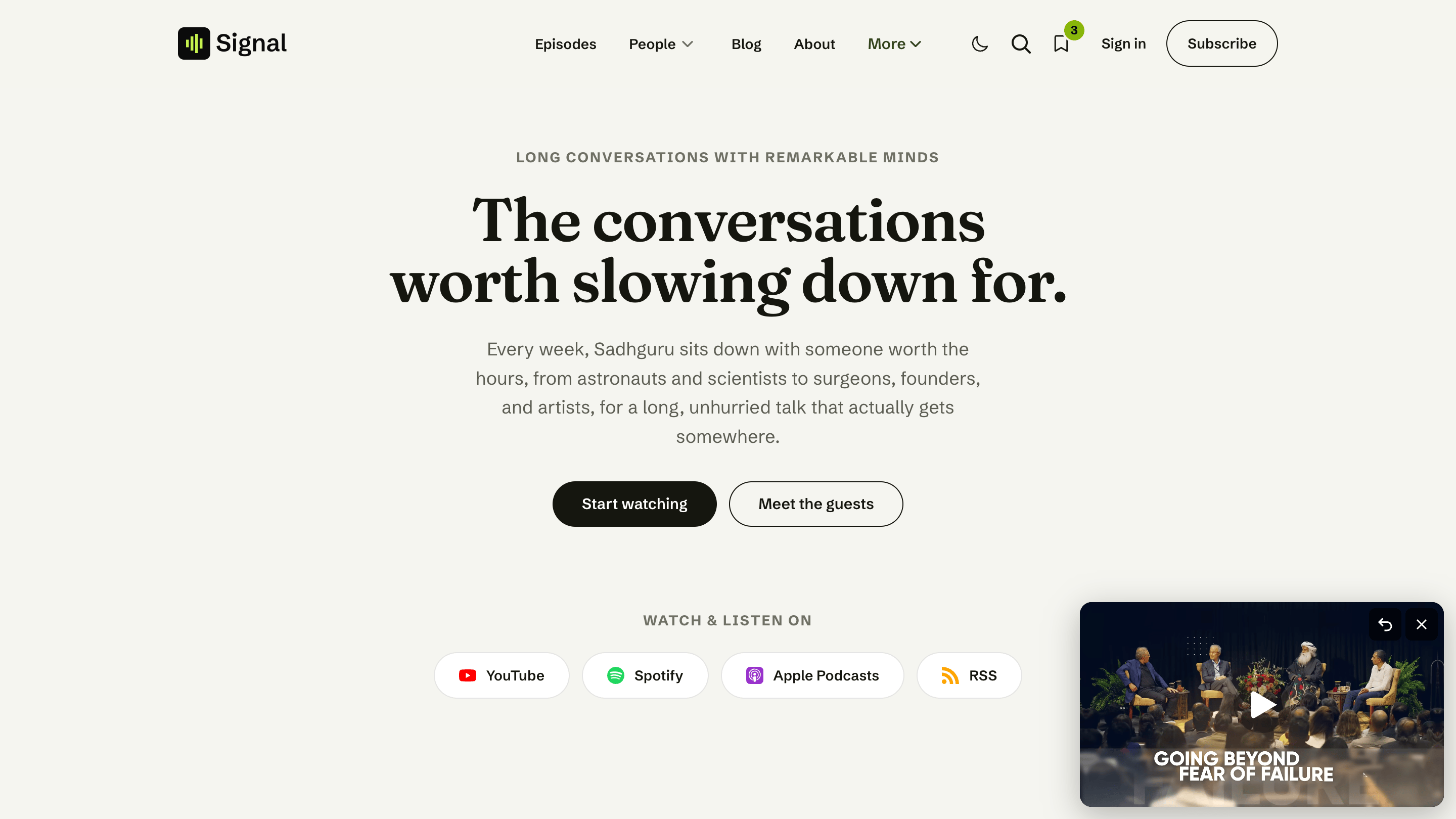
Shows recorded on camera. Episodes open with a video hero that keeps playing as listeners browse the rest of your site.
Audio show runners
Classic audio podcasts get a clean waveform player, chapters, and a searchable transcript on every episode.
Membership-funded podcasts
Charge for episodes with Ghost tiers and Portal. Members-only media stays out of the public page until they subscribe.
Multi-host shows
Hosts and guests get author profiles, credited per episode and sorted automatically across the site.
Independent creators leaving hosted platforms
Move off a hosting platform and keep your domain, your design, your subscribers, and 100% of your revenue. The included Signal Tools extension imports your back catalog into Ghost drafts, with transcripts and chapters.
Probably not for: one-page sites or text-only blogs with no episodes. Signal expects shows, episodes, hosts, and a publishing rhythm.
One theme, every format
Four kinds of episodes.
Most Ghost themes do one format. Signal does four, each with the right player and the right page. Choose per episode, from Ghost Admin.
Video
Recorded on camera. Opens full in the hero and docks into the corner mini-player as your audience keeps browsing.
Audio
A clean waveform player, with the same tappable chapters and searchable transcript as a video episode. Docks and keeps playing too.
Embed
Drop in a Spotify, YouTube, or other hosted player and it plays right in the hero, no setup required.
Blog
Publish a plain, reader-focused article alongside your episodes. It gets its own index and RSS feed, with no player or tabs.
How it works
Launch an episode in three steps.
From a raw recording to a polished episode page, Signal and the included Signal Tools extension handle the slow parts for you.
Import with Signal Tools
Paste a YouTube link, an audio file, or a podcast feed to start a new episode.
Publish in Ghost
Review the draft, add hosts and guests, set it free or members-only, and hit publish. Everything renders on a purpose-built episode page.
Play anywhere they go
The persistent player keeps the episode going as people browse, and listen links point them to Apple Podcasts, Spotify, YouTube, or wherever they subscribe.
Included with Signal · Signal Tools
From a link to a published episode.
Paste a YouTube video, an audio file, or a podcast feed, and Signal Tools does the busywork of every episode for you.
See everything it does


Persistent media player
An episode that keeps playing wherever they go.
Press play and the episode starts inline in the hero. As a listener scrolls or moves to another page, the player docks into a small floating mini-player in the corner and keeps going. No restarts, no losing their place. Video and audio dock and follow along; embeds play inline. Nothing loads until they press play.

Inline where the episode starts
The episode opens in the hero, full and clear, exactly where a listener expects it.

Docks into a corner mini-player
Scroll on or open another episode and the player tucks into the corner, still playing. Choose bottom left or bottom right.
Video and audio
Upload to Ghost, or embed from YouTube and Vimeo. Audio shows get a clean waveform player.
Lock-screen controls
Episode title and artwork appear on the device lock screen, notification shade, and media keys.
Members-only privacy
For locked episodes, the media source never sits in the public page. It loads only when a member presses play.
Light on data
Pages stay quick on phones and slow networks, with no heavy media downloaded up front.
Transcripts & chapters
Make every minute searchable.
Long-form audio and video are hard to skim. Signal turns each episode into something you can search, jump around, and read. Tap any chapter or transcript line and the player jumps straight to that moment.

A transcript that follows along
The transcript scrolls with the episode and highlights the current line. Tap any line to jump there.

Chapters listeners can tap
A clean chapter list lets people jump to the part they came for. Add them as a simple list in the editor.

Search inside the episode
Type a word and the transcript filters to the lines that match, so a listener finds the exact moment in seconds.
Word-by-word highlight
A karaoke-style mode lights up each word as it is spoken. Switch to line highlight, or turn it off.
Auto-scroll
The transcript keeps pace with playback, and pauses the moment a reader scrolls on their own.
Better for search engines
A full transcript on the page gives Google real text to index, so episodes become findable.
Open standard
Your transcripts stay yours.
Every Signal transcript is a plain WebVTT file, the open web standard for captions and timed text. It lives inside your post and travels with your content. Even the word-by-word highlight is built on standard WebVTT cue timestamps, so it is the spec doing the work, not a trick only Signal understands.
- Renders in any WebVTT-compatible player, anywhere
- Word-level timing via standard cue timestamps
- No lock-in. Move to another theme or platform one day and your transcripts come with you

Library
Save episodes and posts, and pick up where they left off, no sign-in.
Listeners can save any episode or blog post, and resume playback right where they left off, all without creating an account. Everything is stored in their own browser, so there is no friction to engage and nothing for you to manage.

A Library page of their own
A full page at /library/ collects in-progress episodes under Continue and bookmarks under Saved.

Always one tap away
A small Library control in the header shows the count and opens a popover with Continue and Saved, kept in sync across tabs.
Continue watching
Signal remembers how far into an episode someone got and offers to resume, on video, audio, and embed episodes alike.
Bookmark anywhere
A save toggle sits on every episode and blog post, in rows and cards alike. Tap once to save, tap again to remove.
Private by design
It all lives in the listener's browser. No account, no server-side tracking, nothing to collect.
Listen links
Point listeners to wherever they subscribe.
Set your show's platforms once and Signal surfaces them across the site: a "Watch and listen on" band on the homepage, large branded tiles on your Subscribe page, and compact pills under each episode and in the footer. More than 22 platforms are supported, plus your own custom ones.


Choose the homepage that fits your show.
Six hero layouts, all chosen from Ghost Admin. Below the hero, sections for featured episodes, recent conversations, hosts, guests, sponsors, support, and your newsletter appear only when you have something to show. Tap any layout to inspect it full-size.

Latest episode
Leads with your newest episode, ready to play. The default, and the right pick for most shows.

Centered statement
A bold introduction to your show, with space to say what it is about and who it is for.

Split portrait
Pairs your message with a portrait, ideal for host-led and personality-driven shows.

Newsletter signup
Puts the email signup front and center for shows growing an audience by inbox.

Cinematic, framed
A dramatic, framed hero for video-first shows that want to open on an image.

Cinematic, full-width
The same drama, edge to edge, for the boldest first impression.
Membership
Charge for episodes, on your own terms.
Signal builds a Subscribe page straight from your Ghost tiers, paywalls episodes when you want them members-only, and handles sign-in and accounts through Ghost Portal. Keep 100% of your revenue, with subscribers in your own database.

A Subscribe page from your tiers
Your paid tiers appear with their prices, taglines, and benefits, plus a one-time tip button and your listen links.

A purpose-built episode page
Show notes, chapters, transcript, hosts and guests, and comments, organized into tidy tabs.
Members-only episodes
Lock an episode to members or a tier. Non-members see a cover and a prompt to subscribe.
Sign in and account
Sign in, Subscribe, and Account live in the header and open Ghost Portal, no setup required.
Tips and donations
Add a one-time support button so casual listeners can chip in without committing to a tier.
Built on Ghost, the way Ghost works.
No custom fields to learn, no fragile setup to maintain. Episodes are posts, hosts and guests are authors, shows and topics are tags. If you know Ghost, you already know Signal.

Shows and topics from tags
Group episodes by show or subject with ordinary Ghost tags, browsable with filter chips.

Hosts and guests from authors
Credit hosts and guests as Ghost authors. Signal sorts them by role automatically across the site.
Video, audio, or embed
A simple tag tells Signal whether an episode is video, an audio waveform, or a third-party embed.
Featured episodes
Mark an episode as featured and it surfaces in its own row on the homepage.
Up next
Each episode suggests more from the same topic, keeping listeners moving through your catalog.
Signal Tools, included
The slow parts of publishing, handled for you.
Signal Tools is a browser extension included with your Signal license, activated with the same license key from your Signal purchase on up to 4 browsers or devices at once. It turns a YouTube video, an audio file, or a podcast feed into a ready-to-publish episode, writing the show notes, transcript, and chapters, then sends a draft to Ghost. It even adds guests as proper Ghost authors. The theme works with it or without it, and your keys never touch our servers.

Import an episode
Paste a YouTube link, upload an audio file, or point it at a podcast feed. The extension does the rest.

A finished Ghost draft
Show notes in the body, the transcript and chapters in place, a cover image, and audio attached. It never publishes for you.
Moving from YouTube, Anchor, or another host? Save a podcast feed and Signal Tools can import your back catalog into Ghost drafts, transcripts and chapters included. New episodes are tracked as they land, ready to import whenever you are.
Episode importer
YouTube, audio file, or podcast link to a draft with notes, transcript, chapters, and cover.
Guest importer
Ghost has no quick way to add staff in bulk. Signal Tools adds a guest as a credited author, with bio, photo, and social links, in one step.
Batch podcasts
Save a feed and Signal Tools tracks new episodes as they land, ready for you to import in a click.
Bring your own AI keys
Use your own free Gemini key, with optional AssemblyAI for audio and an optional Claude backup. Your keys are stored locally on your device, never synced to the cloud.
Private by default
Enova Studio never sees your keys or your content. Each key reaches only the service it belongs to, like your own Gemini or your own Ghost site.
Included with Signal
Your theme license unlocks the extension. One activation per browser, easy to move between devices.
Accessibility
Built for everyone.
Signal is built to a high accessibility standard, so your show is easy to use for every listener and ranks better on Google. Keyboard navigation throughout, ARIA landmarks, visible focus states, strong contrast, and reduced-motion support all come standard. The episode tabs and share menu are fully keyboard-operable.
See it on the live demo
From the builder
Built by a Certified Ghost Expert.
"I wanted podcasters to run a real show on Ghost without bolting on plugins or fighting a blog theme. Signal is that, and Signal Tools takes the busywork out of every episode."Kasun Jayarathna · Builder · Certified Ghost Expert
Signal is built by Kasun, a Certified Ghost Expert who works on Ghost CMS setup, migration, customization, and production publishing workflows every day. When you need help with the theme, you are dealing with someone who knows Ghost inside out.
Installation help is available on request. Product issues and setup questions are handled by email.
Everything in the box.
One theme and one companion extension, built to run a podcast end to end, with every part made to work together.
Media player
- A persistent player that docks into a corner mini-player across pages
- Video, uploaded audio with a waveform, and third-party embeds
- Lock-screen and media-key controls with title and artwork
- Members-only media kept out of the public page
Episode tools
- Searchable transcripts with click-to-seek and auto-scroll
- Word-by-word or line transcript highlighting
- Tappable chapters that jump the player to the moment
- Hosts and guests, comments, and a share menu, all in tabs
Homepage and layouts
- Six hero layouts, chosen from Ghost Admin
- Sections that appear only when you have content for them
- Featured episodes, hosts, guests, sponsors, and support sections
- Inline or hamburger-menu navigation with dropdowns
Membership and growth
- A Subscribe page built from your Ghost tiers
- Members-only episodes with Ghost Portal sign-in and accounts
- One-time tips and donations
- Listen links for 22+ platforms, plus your own custom ones
- Native Ghost newsletter signup on the homepage and Subscribe page
Reader tools
- A browser-local Library that saves episodes and posts, with a header count
- Continue watching, with resume on video, audio, and embed episodes
- Light, dark, or system color scheme, with an optional dark-mode logo
- Built-in episode search and a guest directory
Signal Tools extension
- Import episodes from YouTube, audio files, or podcast feeds
- Auto-generated show notes, transcript, and chapters
- Guest importer and batch podcast import
- Included with the theme, on Chrome and Firefox
Speed, accessibility, and developers
- A modern Vite and Tailwind build, kept lean by page-specific scripts and media that loads only on play
- Keyboard navigation, ARIA landmarks, and reduced-motion support
- Source files included for deeper customization
License and support
- Single-site or Unlimited license
- Lifetime updates
- 14-day money-back guarantee
Setup guides at a glance.
Jump straight to the guide for anything you'll set up on day one. Every guide is written for creators, not just developers.
Media player
Set up the persistent player, pick a mini-player position, and add video, audio, or embeds.
Transcripts & chapters
Add a searchable transcript and tappable chapters to any episode.
Listen links
Connect Apple Podcasts, Spotify, YouTube, RSS, and more, including custom platforms.
Library
Understand how saved episodes and Continue watching work for your listeners.
Membership
Build the Subscribe page from Ghost tiers and lock episodes to members.
Signal Tools
Install the extension, add your AI keys, and import your first episode.
Navigation
Inline or hamburger-menu navigation, dropdowns, and external links.
Theme settings
Color scheme, fonts, dark-mode logo, navigation style, and homepage layout.
Content model
Episodes, hosts and guests, shows and topics, and episode types.
Licensing
One site, or every site you run.
Both licenses are a one-time payment with lifetime updates, the full source, email support, and the 14-day money-back guarantee. The only difference is how many production sites you may run it on.
Single-site license
$129
- One live production Ghost site
- Development and staging copies of that site included
- Client work: one license per client site
Unlimited license
$229
- Every live production Ghost site you own or operate
- One person or one organisation, any number of publications
- Pays for itself from the second site
Both buttons open the same checkout. Pick Single-site or Unlimited on the checkout page before you pay. Already own a Single-site license and need Unlimited? Email hello@enova.studio from your purchase address and we will send an upgrade link for the $100 difference. Full terms are in the Terms of Service.
Questions?
Which Ghost version does Signal support?
routes.yaml once to enable the episode, people, and topic routes. See the compatibility guide.Do I need to know code?
Does Signal work for audio shows as well as video?
Can I publish written posts too, not just episodes?
Are my transcripts locked into Signal?
What is Signal Tools, and how do I get it?
Can I charge for episodes?
Can I add guests to an episode?
Can I move my existing podcast onto Signal?
What is included in the download?
Can I modify the design?
What if the theme isn't right for me?
What does the license cover, including client work?
Everything you get
One payment, the whole podcast toolkit.
- The Signal theme, source and production build
- The Signal Tools extension
- Lifetime updates
- Email support from a Certified Ghost Expert
- Single-site or Unlimited license, your pick
- 14-day money-back guarantee
$129
Single-site. Unlimited license for every site you own: $229.
One-time payment. No monthly platform fees.
Get SignalReady to launch your podcast with Signal?
Get the full theme, source files, documentation, email support, and lifetime updates.
New to Ghost? We set Signal up for you, free, when you start Ghost Pro through our link. See how it works
One-time payment · Lifetime updates · Single-site or Unlimited license · 14-day money-back guarantee
Not the right fit for your site? Email us within 14 days of purchase for a refund, less the payment processing fee.
Not quite right? Try another theme.

Quiet: a Ghost theme for writers and authors
A premium Ghost CMS theme for a writer's own site: essays first, with a newsletter, podcast, films, portfolio and gallery composed from pages.

Meridian: a Ghost news theme
A premium Ghost CMS news theme for newsrooms, magazines, and digital publishers.

Enova: a Ghost magazine theme
A premium Ghost CMS magazine theme for lifestyle, business, and paid-membership publications.

Miyus: a minimal Ghost blog theme
A premium Ghost CMS theme for lifestyle creators and independent writers.